CAM that checks its own G-code.

VectorMill plans 2D, V-carving and 3D toolpaths, simulates them on the stock, and posts programs for the controllers CNC routers run. Before a program can be saved, VectorMill reads it back and checks it against the calculation.

Both products are in development. Neither is for sale yet. Release status

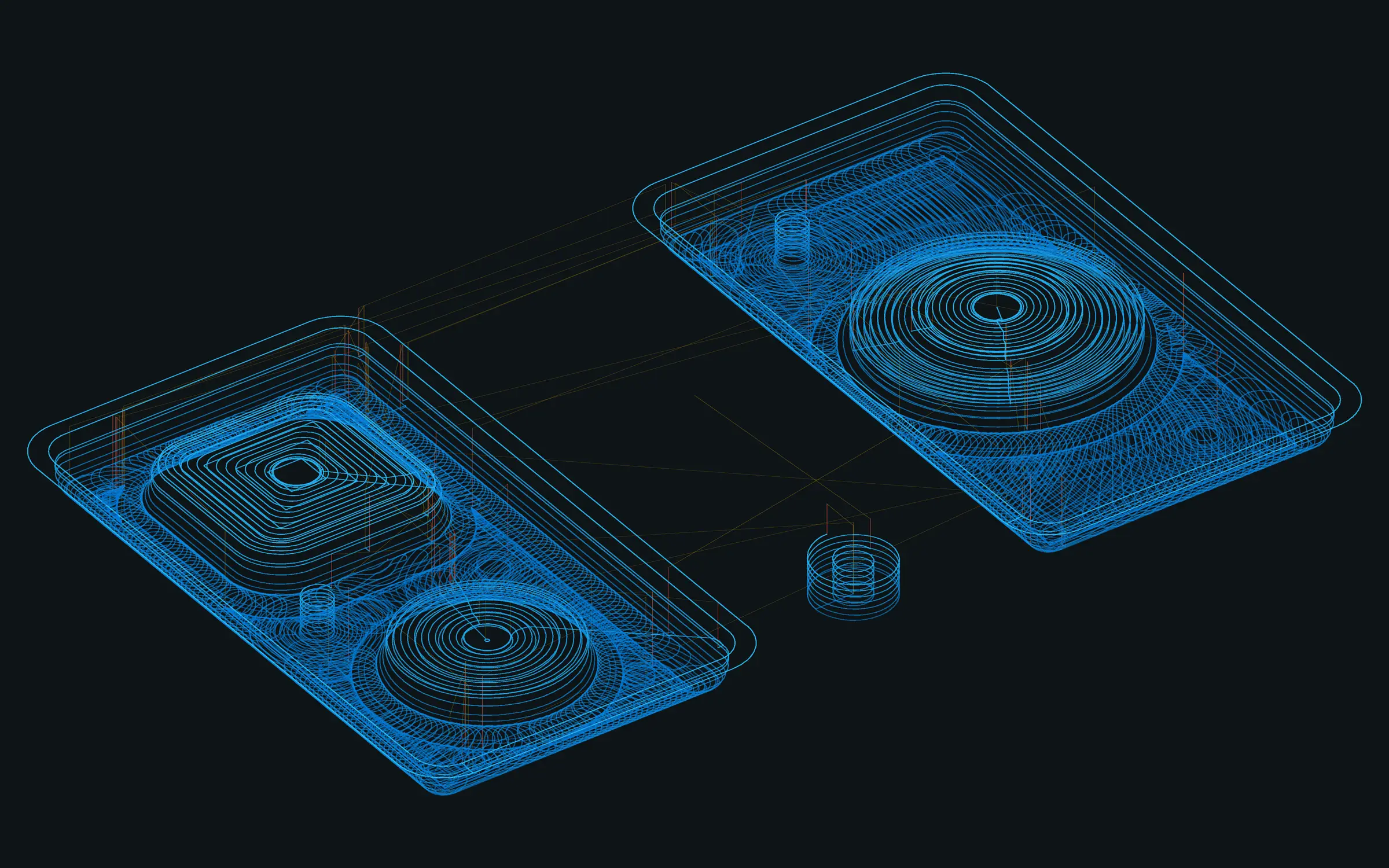
Toolpath plot of a roughing program for two test parts seen at an angle: stacked constant-engagement loops clearing around a dome, a rounded-square form and a round form, with a small helical bore beside them.
A bore, 3D Adaptive roughing and 3D Flat on the two parts of the 3D test kit: 69,412 moves with a 1/4 in flat end mill. Plotted from the NC file VectorMill posted for UCCNC, not a screenshot. Blue is cutting, amber is rapids, red is plunges.

From a model to a program you can trust at the machine

Built for CNC routers and small shops: one tool per file, a pause before any motion, and a setup sheet that says where to set Z0.

  1. Plan

    Pick the part, set the stock and work zero, and add operations: pockets, contours, drilling, V-carving, 3D roughing and finishing. Each operation keeps its own tool, feeds and heights.

  2. Simulate

    Material is removed along the posted program, as rounded. Compare to part colours what is left, and a report lists the deepest gouge, rapids that cut and material above the flutes.

  3. Post and check

    The post writes the program in your controller’s own wording. The review reads that text back and checks it move by move. Only the reviewed text is saved.

The file you run is the file that was checked

A toolpath on screen and the numbers in an NC file are not the same thing. Rounding, modal words and a controller’s dialect all sit between them. VectorMill closes that gap itself.

  • The program is parsed as written, to the last decimal the controller will read.
  • 3D sections are rechecked against the part after rounding.
  • The header says what the file assumes: tool, units, work offset, clearance.
  • The setup sheet says what was not checked, so you know what is left to you.

Software checks do not replace an air cut. Air-cut every new program before cutting material.

(VectorMill 0.65.2 - UCCNC - SINGLE OPERATION - VERIFY BEFORE MACHINING)
(3D Scallop - finish)
(Tool 2 - 1/4 in ball end mill)
(Units INCH - feeds per minute)
(Before start install and measure this tool in G54)
(Verify work zero, temporary offsets, fixtures and a clear Z then XY approach)
(UCCNC native profile units MUST match this file - no G20 or G21 is sent)
M5
M9
G90 G94 G17 G40 G80
G64
G54
S18000 M3
(Wait for spindle speed and verify preset tool and clearance before Cycle Start)
M0
G0 Z0.201837
G0 X-2.899044 Y-1.995833
From a finishing program for the 3D test kit, shortened. Its setup sheet ends: “Every file was read back and matched the calculation; 3D sections were rechecked after NC rounding. Not checked: fixtures, holders, remaining stock, machine travel.”

Two ways to run it

The same machining core in both. Choose by where your parts live.

VectorMill for Rhino logo: a metal V cut by an end mill, beside a rhino’s head
Working prototype, version 0.81.0

VectorMill for Rhino

A CAM plug-in for Rhino 8 on Windows. Plan toolpaths on the geometry you already have in Rhino, simulate them on the stock, and post G-code, without leaving the model. The job is saved inside the .3dm file.

  • Windows, Rhino 8.35 or newer
  • 26 operations, including the 4th axis
  • 8 controller posts
Private test builds, version 0.42.0

VectorMill Manufacturing

A standalone CAM application for Windows. No Rhino needed. Model a part or bring one in, set up the job, and machine it in the Manufacture workspace. It runs the same machining core as the Rhino plug-in, so both plan and post the same way.

  • Windows, nothing else to install
  • Model, or open STEP, DXF and SVG
  • 10 controller posts, with Haas and Fanuc

Toolpaths for flat work, carving and 3D

Clearing at constant engagement, profiles on tabs, text V-carved to sharp corners, and finishing passes that follow the surface.

Every operation in VectorMill for Rhino
Every operation in VectorMill Manufacturing

2D

  • Facing
  • 2D Pocket
  • 2D Adaptive
  • 2D Contour
  • Bore
  • Circular
  • Drilling
  • 2D Chamfer

Carving

  • 2D V-Carve
  • 2D Engrave
  • V-Carve Flat Clearing
  • Trace

3D

  • 3D Rough
  • 3D Adaptive
  • 3D Parallel
  • 3D Waterline
  • 3D Steep and Shallow
  • 3D Pencil
  • 3D Spiral
  • 3D Radial
  • 3D Scallop
  • 3D Flat
  • 3D Between Curves

4th axis

  • Rotary Roughing
  • Rotary Parallel
  • Rotary Contour
Toolpath plot seen from above: curved constant-engagement passes sweeping across a rectangular pocket and wrapping round a large circular island.
2D Adaptive clearing a pocket around a round island, seen from above. Plotted from the posted NC file, not a screenshot.

Posts written for specific controllers

Each controller has its own dialect: the same toolpath, worded the way that controller wants it. The review reads the program back by the same dialect.

  • UCCNC
  • Mach3
  • Mach4
  • LinuxCNC
  • GRBL 1.1
  • grblHAL / FluidNC
  • Masso
  • ACU-RITE MILLPWR G2
  • Haas
  • Fanuc

UCCNC programs have been cut on a router. The others are checked in software. Details are on each product page.

Where it stands today

  • Both products are in development. Neither has had a commercial release.
  • All machine time so far is on one hobby router, in wood, in inches.
  • A test plate cut with the Rhino plug-in measured within about 0.005 in of the drawing.
  • No holder, fixture or machine-travel checks. Feeds and speeds are yours to set.

We would rather say this here than have you find it at the machine.

Buy it once. Keep it running.

How licensing is planned to work. The licence agreement, still being written, will set the final terms before the first commercial release.

  • One purchase per major version. No subscription.
  • Three computers per seat, for one user.
  • Runs offline indefinitely once activated.
  • An upgrade never switches off the version you bought.